How to Fill Out a W-4 for the First Time (2026 Step-by-Step Guide)
⚡ How to fill out a W-4 for the first time — quick answer
For most first-time workers who are single with one job and no dependents, filling out a W-4 takes about 2 minutes:
- Step 1 — Enter your name, address, Social Security number, and check Single
- Step 2 — Leave blank (one job, not married)
- Step 3 — Leave blank (no dependents)
- Step 4 — Leave blank (no other income or deductions)
- Step 5 — Sign and date the form
Steps 1 and 5 are required for everyone. Steps 2, 3, and 4 only apply in specific situations. Single with one job and no dependents — fill in Step 1, sign Step 5, hand it in.
How to fill out a W-4 for the first time sounds more complicated than it is. For most people starting their first job, it takes about two minutes.
The W-4 is the form you give your employer on day one. It tells them how much federal income tax to pull from each paycheck and send to the IRS on your behalf. Get it right and your taxes are roughly accurate all year. Withhold too much and your paychecks are smaller than they need to be. Withhold too little and you owe money in April — sometimes with a penalty.
This guide walks through every step of the 2026 W-4 in plain English, including the changes that took effect this year, what to do if you are a teenager filling this out for the first time, and what happens if you make a mistake.
Think of this as the W-4 explained for dummies — no tax knowledge required.
Table of Contents
What is a W-4 form and why does it matter?
The W-4 is a one-page form you fill out on your first day of work. Your employer uses it to figure out how much federal income tax to pull from each paycheck. That money goes to the IRS as a prepayment toward whatever you owe at tax time.
💡 The one-sentence explanation
Your W-4 does not decide how much tax you owe. That gets figured out when you file your return in April. What the W-4 controls is how much of that tax gets taken out of your paycheck throughout the year as you go.
| If you withhold… | What happens at tax time | Is this good? |
|---|---|---|
| Too much | Smaller paychecks all year — you get a refund in April | Not ideal — you gave the government a free loan |
| Too little | Larger paychecks all year — you may owe taxes plus a penalty in April | No — can be a nasty surprise |
| Just right | You owe little or nothing and get little or nothing back | Yes — your money stayed in your pocket all year |
The allowances myth — important for first-timers
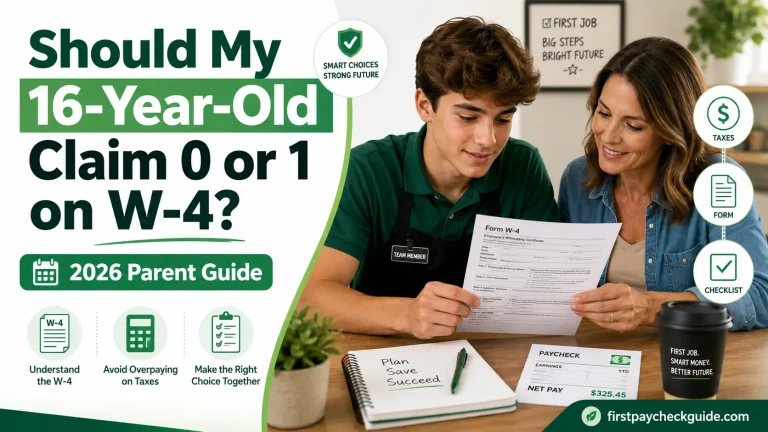
If you are reading an article that tells you to claim 1 allowance or claim 0 allowances on your W-4 — stop. That article is describing a form that no longer exists. The IRS redesigned the W-4 in 2020 and removed the entire allowances system. The 2026 W-4 has no allowances section anywhere on it.
Download the official 2026 W-4 form
Get the official 2026 W-4 directly from the IRS: irs.gov/forms-pubs/about-form-w-4
Print it, fill it out following the guide below, and hand it to your HR department on your first day.
Want to see where W-4 withholding shows up on your paycheck? Read: How to Read a Pay Stub →
What changed on the 2026 W-4 form?
The 2026 W-4 picked up a few changes from the One Big Beautiful Bill Act. Most of them will not affect you as a first-time single worker — but here is what changed:
| What changed | 2025 | 2026 | Who it affects |
|---|---|---|---|
| Child Tax Credit per qualifying child under 17 | $2,000 | $2,200 | Parents with children under 17 |
| Deductions Worksheet (Step 4b) | 5 lines | 15 lines | Anyone using itemized deductions |
| New deductions on worksheet | Not available | Qualified tips, qualified overtime, vehicle loan interest | Tipped workers, overtime earners |
| Tax-exempt checkbox | Written in Step 4 | New dedicated checkbox between Steps 4 and 5 | Anyone claiming exemption from withholding |
Does any of this affect you as a first-time worker?
Probably not. The Child Tax Credit change matters if you have kids. The new deductions worksheet matters if you plan to itemize — which most first-time workers do not. If you are single, one job, no dependents, the 2026 W-4 fills out the same as always: Step 1 and Step 5 only.
How to fill out a W-4 for the first time — step by step
Here is every step on the actual 2026 W-4 form explained using real screenshots. Follow along with your own form as you go.
Step 1 — Enter your personal information (required for everyone)
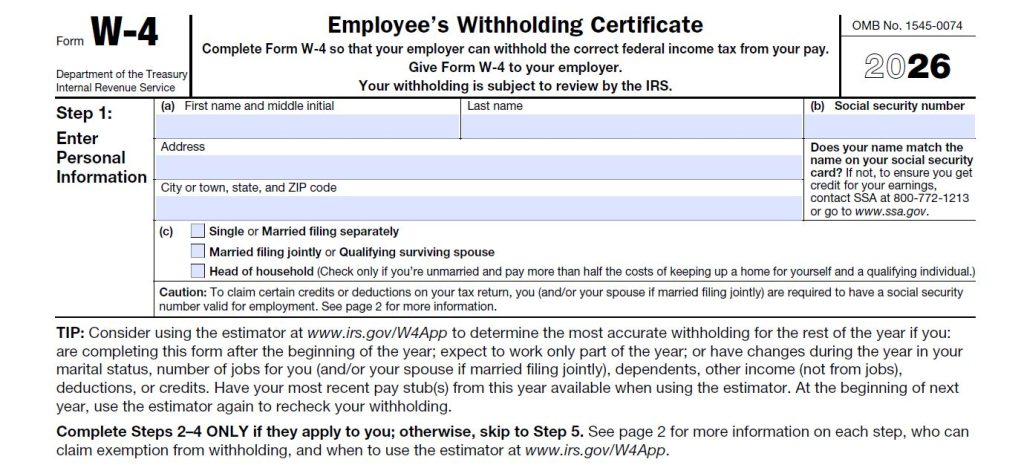
This is the only section everyone fills out — no exceptions.
What to write in each field
First name and middle initial: Use your legal first name exactly as it appears on your Social Security card. If your card says “Alexander” do not write “Alex.” Middle initial is optional but include it if your card has one.
Last name: Exactly as it appears on your Social Security card. Spelling matters — this is how the IRS matches your earnings to your tax record.
Social Security number: The 9-digit number on your Social Security card. Your employer needs this to report your wages to the IRS. Do not guess — get the exact number right.
Address: Your current home address. Use where you actually live, not a parent’s address or PO box.
City, state, ZIP code: Make sure the ZIP is correct.
Section (c) — Filing status: which box do you check?
This is the most important choice in Step 1. Check exactly one box — only one.
| Filing status option | Check this if… | Right for most first-timers? |
|---|---|---|
| Single or Married filing separately | You are not married | ✅ Yes — this is the right choice for most 21–26 year olds at a first job |
| Married filing jointly | You are married and filing your return with your spouse | Only if you are married |
| Head of household | You are unmarried AND pay more than half the costs of a home for a qualifying person who lives with you | Only in that specific situation |
💡 For most first-time workers
Check Single or Married filing separately. It withholds slightly more tax than the other options — which means you are less likely to owe the IRS in April. Safer choice when you are new to this.
The tip box on the form — should you use the estimator?
The form has a TIP section suggesting you use the IRS estimator at irs.gov/W4App. For a simple first job — single, one employer, no other income — you do not need the estimator. The estimator is useful when your situation is more complex: multiple jobs, self-employment income, or significant changes during the year. Skip it for now and revisit in January.
⚠️ Important note at the bottom of Step 1
The form says “Complete Steps 2–4 ONLY if they apply to you; otherwise, skip to Step 5.” This is the IRS telling you in plain language that Steps 2, 3, and 4 are optional for most people. If you are single with one job and no dependents — go straight from Step 1 to Step 5.
Step 2 — Multiple jobs or spouse works (skip if not applicable)
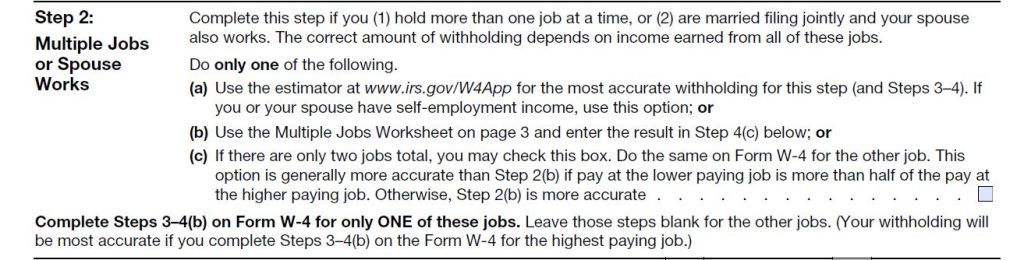
Look at what Step 2 says at the very top: “Complete this step if you (1) hold more than one job at a time, or (2) are married filing jointly and your spouse also works.”
🟢 One job, not married — skip this entirely
If this is your only job and you are not married, leave Step 2 completely blank. Move straight to Step 3. There is nothing to fill in here for you.
If you do have a second job, Step 2 gives you three options. Here is what each one means:
| Option | What it means | When to use it |
|---|---|---|
| 2(a) — Use the IRS estimator | Go to irs.gov/W4App and it calculates the right withholding for you | Most accurate option — especially if you or your spouse have self-employment income |
| 2(b) — Use the Multiple Jobs Worksheet on page 3 | A table on page 3 of the form helps you calculate additional withholding | Works but less accurate than the estimator |
| 2(c) — Check the box | Check this box AND the same box on the W-4 for your other job | Only works if you have exactly two jobs and they pay similar amounts |
If you have a second job — use option (a)
Go to irs.gov/individuals/tax-withholding-estimator and let it do the math. It takes about 5 minutes and gives you the most accurate withholding amount. Do not try to calculate this manually for your first time.
Step 3 — Claim dependents and other credits (skip if you have no dependents)

Step 3 is for people with children or other dependents. If you have none — leave this entire section completely blank and move to Step 4.
🟢 No kids, no dependents — leave blank
Most first-time workers skip Step 3 entirely. There is nothing to fill in if you have no children or other people you financially support.
If you do have dependents, here is how the math works for 2026:
| Line | Who it covers | Amount per person (2026) | Example |
|---|---|---|---|
| 3(a) | Qualifying children under age 17 as of December 31, 2026 | $2,200 per child | 1 child = $2,200 · 2 children = $4,400 |
| 3(b) | Other dependents who do not qualify for the child tax credit (older children, qualifying relatives) | $500 per dependent | 1 other dependent = $500 |
| Line 3 total | Add lines 3(a) and 3(b) together | Write the combined total in the Step 3 box | $2,200 + $500 = $2,700 |
What does entering a number here actually do?
It tells your employer to reduce your withholding throughout the year by the amount of child tax credit you expect to claim at tax time. This means your paychecks are a little larger every pay period instead of getting the credit back as a lump sum refund in April. Either way you get the credit — it is just a question of when.
The income limit on Step 3
Step 3 says “If your total income will be $200,000 or less ($400,000 or less if married filing jointly).” This limit applies to almost every first-time worker — so do not worry about it. It only matters for high-income earners.
Step 4 — Other adjustments (optional — most first-timers leave all three blank)
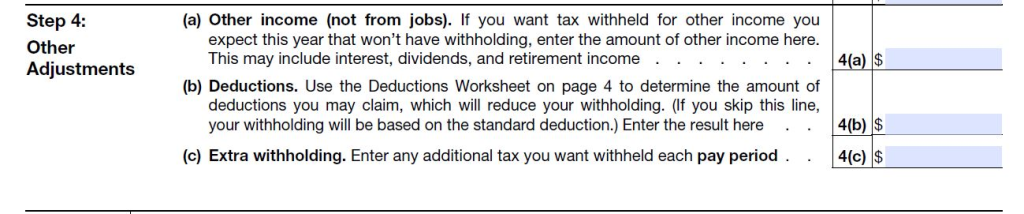
Step 4 has three separate parts — (a), (b), and (c). All three are optional. For most first-time single workers with one job, all three stay blank.
Step 4(a) — Other income not from jobs
This is for money you earn outside of work — investment dividends, rental income, freelance payments, interest income, or retirement distributions. If you have none of those, leave it blank.
If you do have other income and skip this line, no tax will be withheld on that income during the year — which means you may owe it all at once in April. If you have a side hustle earning meaningful income, entering an estimate here prevents that April surprise.
Step 4(b) — Deductions
This is for people who plan to itemize their deductions on their tax return instead of taking the standard deduction. For 2026, the standard deduction for single filers is $16,100. Unless your deductible expenses — mortgage interest, state taxes, charitable donations, medical expenses — exceed $16,100, you will take the standard deduction and leave 4(b) blank.
The form says: “If you skip this line, your withholding will be based on the standard deduction.” For most first-time workers, that is exactly right. Leave it blank.
Step 4(c) — Extra withholding
This lets you add a fixed extra dollar amount to be taken from every single paycheck. For example, entering $50 here means an extra $50 comes out of every paycheck on top of the normal withholding.
The only real reason to use this is if you know you will owe taxes at year end — from side income, freelance work, or investment gains — and want to pay them gradually rather than all at once in April. For a standard first job with no other income, leave this blank. Adding extra withholding just makes your paychecks smaller for no benefit.
🟢 Summary for most first-time workers
4(a) blank · 4(b) blank · 4(c) blank · Move to Step 5.
Exempt from withholding + Step 5 — Sign here (required for everyone)
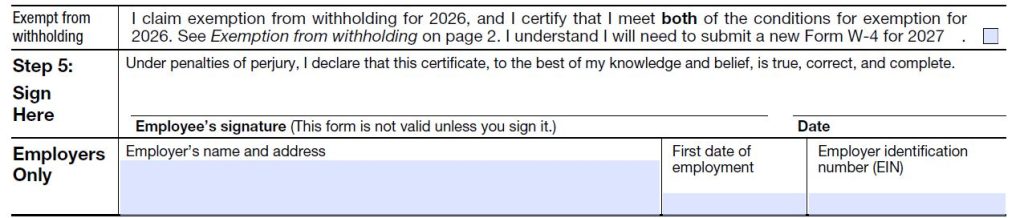
You are almost done. This last section has two parts — the exempt checkbox and your signature.
The exempt from withholding checkbox
The checkbox at the top of this section says: “I claim exemption from withholding for 2026, and I certify that I meet both of the conditions for exemption.”
You can check this box only if BOTH of these are true:
- You had no federal income tax liability in 2025 (you owed nothing)
- You expect to have no federal income tax liability in 2026
For most teenagers earning part-time wages below $16,100 in 2026, this is often true. For most 21–26 year olds earning a full-time salary, this is not true — do not check this box.
If you check this box, skip Steps 2, 3, and 4. Complete only Step 1 and Step 5. You still pay Social Security and Medicare taxes regardless — claiming exempt only affects federal income tax withholding. You must also submit a new W-4 every year by February 16 to keep the exemption.
⚠️ Not sure if you qualify for exempt? Do not check it
If you are unsure, leave the exempt checkbox blank and let normal withholding run. It is much safer to withhold a little and get a small refund than to claim exempt incorrectly and owe a large bill in April.
Step 5 — Employee’s signature
Sign your legal name — the same name you wrote in Step 1. Write today’s date next to it.
This is not optional. The form literally says “This form is not valid unless you sign it.” An unsigned W-4 means your employer will treat you as single with no adjustments — which is actually fine for most first-timers, but you still need to sign it for it to be official.
⚠️ The “Employers Only” section at the very bottom
Do not fill in the Employers Only section. Your HR or payroll department completes this with the company name, your first date of employment, and their Employer Identification Number (EIN). Leave it blank when you hand the form in.
✅ You are done — here is what to do next
Hand the completed form to your HR or payroll department — not the IRS. Your employer keeps it on file and uses it to set up your withholding in the payroll system. Keep a copy for yourself. Changes take effect on your next payroll run after HR processes the form.
How to fill out a W-4 for a teenager (first job at 16 or 17)
If you are 16 or 17 filling this out for the first time, the process is basically the same as above. The one extra question that comes up for teenagers is whether you can skip federal income tax withholding entirely.
Can a teenager claim exempt from withholding?
Yes — if both of these are true:
- You had no federal income tax liability last year
- You expect to have no federal income tax liability this year
For most teenagers earning part-time wages below the $16,100 standard deduction for 2026, this is often the case. If you earned less than $16,100 in 2025 and expect the same in 2026, you likely owe no federal income tax and can claim exempt.
How to do it: Check the exempt checkbox between Steps 4 and 5. Then sign and date Step 5. That is all.
Claiming exempt does not mean you never owe taxes — it means no federal income tax is withheld this year. You still pay Social Security and Medicare regardless. If your income ends up higher than expected, you may owe when you file in April.
⚠️ Parents — do not fill this out for your teenager
The W-4 must be signed by the employee — your teenager. You can help them understand it but the form must be in their name, with their Social Security number, and their signature. A parent’s information does not belong on a teenager’s W-4.
What happens if you fill out your W-4 incorrectly?
A W-4 mistake is not a big deal. You can submit a corrected one any time. Here is what each type of mistake actually means:
| The mistake | What happens | How to fix it |
|---|---|---|
| Over-withholding (too much taken out) | Smaller paychecks all year — refund in April | Submit a corrected W-4 with lower withholding anytime |
| Under-withholding (too little taken out) | Larger paychecks all year — may owe taxes plus penalty in April | Submit a corrected W-4 with higher withholding immediately |
| Wrong filing status | Incorrect withholding amount all year | Submit a corrected W-4 with the right status |
| Claimed exempt incorrectly | No taxes withheld — potentially large April bill | Submit a corrected W-4 immediately and add extra withholding to catch up |
You can update your W-4 anytime
You can submit a new W-4 to your employer as many times as you want. Just fill out a fresh one and give it to HR. Changes take effect on your next payroll run. If you made a mistake, this is all it takes to fix it.
When should you update your W-4?
You do not need to redo this every year. Your W-4 stays active until something in your life changes. These are the events that should trigger a new one:
✅ Update your W-4 when any of these happen
- You get married or divorced
- You have a baby or adopt a child
- You get a second job or your spouse starts working
- You quit a job and now have only one income source
- You start freelancing or earning significant side income
- You receive a large tax bill or large refund at tax time
- You buy a home and start itemizing deductions
- Your income changes significantly in either direction
Annual W-4 check — a good habit
Even if nothing major happened, checking once a year in January is smart. The IRS Tax Withholding Estimator at irs.gov takes about five minutes and tells you whether your current withholding still makes sense.
W-4 vs W-2 — what is the difference?
People mix these up constantly. They are two completely different things:
| Document | What it is | When you use it | Who fills it out |
|---|---|---|---|
| W-4 | Tells your employer how much federal income tax to withhold from each paycheck | When you start a new job or your situation changes | You fill it out and give it to your employer |
| W-2 | Shows your total annual wages and total taxes withheld for the year | At tax time — you use it to file your return | Your employer fills it out and sends it to you by January 31 |
How they connect
Your W-4 sets the withholding rate. Your W-2 shows the running total at year end. When you file in April, you compare what was withheld to what you actually owed. The difference is either your refund or your bill.
Where to find and submit your W-4
✅ How to get your W-4
- From your employer — most hand it to you during onboarding paperwork on day one
- Through your payroll portal — ADP, Workday, and Gusto all let you complete it electronically
- From the IRS directly — download the official 2026 W-4 at irs.gov/forms-pubs/about-form-w-4
✅ Where to submit your W-4
- Give it to your HR or payroll department — not the IRS
- If your employer uses an online portal, submit it electronically through the system
- Keep a copy for your own records
- Changes must be implemented by your employer no later than the start of the first payroll period ending 30 days after you submit
Frequently Asked Questions
How do I fill out a W-4 for the first time?
For most first-time single workers with one job and no dependents: fill in Step 1 with your name, address, Social Security number, and check “Single.” Leave Steps 2, 3, and 4 blank. Sign and date Step 5. Submit it to HR — not the IRS. That is the whole form for most people.
How do I fill out a W-4 for my first job?
Complete Step 1 with your personal information and check Single for your filing status. Skip Steps 2 through 4 if you are single with one job and no dependents. Sign Step 5. The whole thing takes about two minutes for most first-job workers.
How many allowances should I claim on my W-4?
The current 2026 W-4 does not have an allowances section. The IRS eliminated allowances when it redesigned the form in 2020. If an article tells you to claim 1 or 0 allowances, it is describing an outdated form. The current W-4 uses filing status, dependents, and extra income instead.
What is the difference between W-4 and W-2?
A W-4 is the form you fill out when you start a job — it tells your employer how much to withhold from each paycheck. A W-2 is the form your employer sends you at year end showing your total wages and taxes withheld. You use your W-2 to file your tax return. You fill out your W-4. Your employer fills out your W-2.
Can a teenager claim exempt on their W-4?
Yes, if you had no federal income tax liability last year and expect none this year. For most teenagers earning part-time wages below the $16,100 standard deduction for 2026, this is often true. Check the exempt checkbox between Steps 4 and 5, then sign Step 5. You still pay Social Security and Medicare regardless of exempt status.
What happens if I fill out my W-4 wrong?
Over-withhold and you get a refund in April but had smaller paychecks all year. Under-withhold and you may owe taxes with a penalty. Either way it is fixable — submit a corrected W-4 to your employer any time. Changes take effect on your next payroll run.
Do I need to fill out a new W-4 every year?
Not unless your situation changes. Your W-4 stays active until you submit a new one. Exception: if you claimed exempt from withholding, you must resubmit every year by February 16 to keep the exemption. For everyone else, update it when you get married, divorced, have a child, start a second job, or your income changes significantly.
What changed on the 2026 W-4 form?
The 2026 W-4 includes changes from the One Big Beautiful Bill Act: the Child Tax Credit in Step 3 increased from $2,000 to $2,200 per qualifying child under 17, the Deductions Worksheet expanded from 5 to 15 lines with new entries for qualified tips and overtime, and a new exempt checkbox was added between Steps 4 and 5. For most single first-time workers, none of these changes affect how you fill out the form.
How do I fill out my W-4 correctly?
For most single first-time workers with one job and no dependents: complete Step 1 with your name, address, Social Security number, and check Single. Leave Steps 2, 3, and 4 completely blank. Sign and date Step 5. That is it. The most common mistake is over-thinking it; most first-timers only need to touch Step 1 and Step 5.
Do you still claim 0 or 1 on a W-4?
No, the current 2026 W-4 does not have a “claim 0 or 1” option anywhere on it. The IRS removed the allowances system entirely when it redesigned the form in 2020. If you are reading advice that says “claim 0” or “claim 1,” that advice is based on an outdated form. The current W-4 uses your filing status, dependents, and other income instead of allowances.
How do I fill out a W-4 to get the most money?
To maximize your take-home pay throughout the year, make sure you are not over-withholding. Check that your filing status in Step 1 is correct. If you have no dependents leave Step 3 blank — do not enter zeros, just leave it empty. Leave Step 4(c) blank — adding extra withholding here reduces every paycheck unnecessarily. Use the IRS Tax Withholding Estimator at irs.gov to confirm your withholding is accurate rather than excessive. Remember: a large tax refund in April means you were giving the government a free loan all year with smaller paychecks.
What is the easiest way to fill out a W-4?
For most single workers with one job and no dependents, the easiest way is: fill in Step 1 with your name, address, Social Security number, and check Single. Leave Steps 2, 3, and 4 completely blank. Sign and date Step 5. That is the entire form for most first-timers — two minutes, done. If your situation is more complex, use the IRS Tax Withholding Estimator at irs.gov/W4App for the most accurate result.
How do I fill out my W-4 to get the most money back?
To get the largest tax refund, you need to withhold more tax than you actually owe throughout the year. You can do this by entering an additional withholding amount in Step 4(c) of the W-4. However a large refund is not actually a financial win — it means you gave the government an interest-free loan all year with smaller paychecks. The better goal is accurate withholding so you neither owe nor overpay. Use the IRS Tax Withholding Estimator to find the right number.
How do I make sure my W-4 is correct?
Use the IRS Tax Withholding Estimator at irs.gov/W4App — it takes about five minutes and tells you exactly what to enter in each step based on your income, filing status, and situation. Also check your W-4 every January and after any major life change: new job, marriage, divorce, new child, or a large tax refund or bill. If your W-4 was correct last year but you got a big refund or owed a large amount, something changed and your W-4 needs updating.
W-4 Done — Now Check Your First Paycheck
W-4 is done. What comes next is seeing what all of this actually looks like on your first paycheck — because even when the W-4 is filled out perfectly, the gap between your salary and your take-home is still going to surprise you the first time you see it.

About the Author
Ashief Mahmood is the Founder and Editor of First Paycheck Guide. He researches and explains first-paycheck topics for U.S. first-time workers using IRS publications, U.S. Department of Labor resources, official employer documentation, payroll sources, and carefully labeled estimates.
Ashief is not a financial advisor, tax professional, payroll provider, lawyer, or employer representative. First Paycheck Guide is an independent educational website.
The information in this article is for educational purposes only and does not constitute tax or legal advice. W-4 rules, tax brackets, and withholding rules change annually — always verify current instructions at irs.gov. The 2026 W-4 changes referenced reflect the One Big Beautiful Bill Act provisions as understood at time of publication. Consult a tax professional for guidance specific to your situation.